32 Claude Code hacks tested: the 7 levers that really count
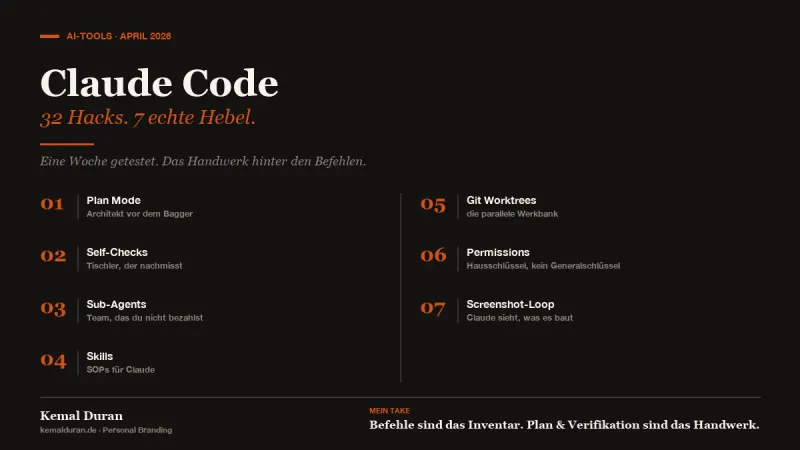
A video is making the rounds in my feed right now: "32 Claude Code hacks from beginner to power user". Forty minutes, rapid-fire talking, and all of it sounds like something you need to know this second.
I watched it. For a week I pushed the individual tips into my real workflow, building websites, producing content, writing automations. This is what stuck with me.
Seven levers that really change something. The rest is nice, but it's comfort.
So you don't have to sit through the video yourself, here are the gold nuggets, with the pictures I built in my head so I really put them to use.
Plan Mode, first the architect, then the excavator:
The excavator is fast. You start digging, the hole gets deep, everything fits. Until you notice that the water pipe ran exactly where you just dug.
Plan Mode is the architect who draws the plan first. You press Shift-Tab and Claude switches to the mode where it may read and think, but changes nothing. It drafts what it would do. Which files it touches. Which decisions it makes. Which questions are open.
You read the plan, correct it, give the green light. Only then does Claude switch back to execution mode.
Sounds like an extra step. But it's the biggest lever in the whole video. Because Claude builds much better on the first try when it has thought first. And you save yourself the two, three rounds of corrections afterward.
For me, Plan Mode is now the default for anything that takes longer than ten minutes. Small tasks: just do them. Real work: plan first.
Self-checks, the carpenter who measures again:
A carpenter who measures again after every cut builds better furniture. Sounds slower. It isn't. Because he doesn't have to throw anything away.
With Claude, this works by building verification steps straight into the to-do list. Instead of:
→ Build the website
You write:
→ Build the website
→ Take a screenshot and check the layout against the brief
→ Open Chrome DevTools, check for console errors
→ Only when both are clean: ask the user
Claude checks itself. It finds most crooked buttons and broken links on its own. You get a V1 that really is at V1 level. Not a V0.4 that you then have to steer upward.
My addition: "Only move on to the next task when you're 95% sure the current one is right." No blind rushing ahead. It's an AI. It knows it can be wrong if you remind it.
Sub-agents, the team you don't have to pay:
Picture yourself in an office, supposed to do three things at once: run a code review, scan fifty articles on topic X and debug an API endpoint. You give up. Nobody manages that all at once.
Sub-agents are the colleagues who take on these three tasks in parallel. Each has its own context, its own brief, its own session. When they're done, they come back to your main thread and say: "Here's what I found."
The main thread stays clean. You don't mix code review and article research in the same conversation.
Bonus lever: you can assign the sub-agents a cheaper model. If a sub-agent scans a hundred articles and only hands you the highlights, it doesn't need Opus. Haiku is enough. The main agent stays on Opus for the synthesis, the sub-agents run on Haiku for the data work. Cuts costs dramatically without any loss in quality.
Skills, SOPs for Claude:
If you're explaining the same task for the third time, stop explaining. Write a skill.
Skills live under .claude/skills/ in your project. A Markdown file that says: "When the user asks for X, do this, then that, then the other thing." With all the details you'd otherwise have to type from scratch every time.
Examples from my setup:
→ tech-debt-audit.md, how Claude scans my code for debt
→ code-review.md, what Claude checks in a review and what it doesn't
→ linkedin-post-schreiben.md, my voice guide, poured into skill form
→ seo-check.md, what an SEO check for my Insights articles looks like
Written once, always on call. You type "run a tech debt audit for me", Claude pulls the skill and runs through the workflow.
Plus: skills are committable. If you work in a team, everyone has the same standard. Nobody has to paste their favorite prompt into Slack.
Git worktrees, the parallel workbench:
Say you're working on a project. One workbench, one workpiece. Now you want to build three features in parallel. Three workpieces, one workbench. That goes wrong.
Worktrees are the second, third, fourth workbench. An isolated copy of your project on its own branch. You type claude --worktree feature-x, and Claude opens a separate workshop where it can work on its own.
You can run three, five, ten of these sessions at the same time. Each one writes to its own branch. When they're done, you merge back like with any normal branch.
This is the answer to the problem "I want several things to run in parallel, but they keep writing over each other." Without worktrees: chaotic. With worktrees: scalable.
If you ever thought "I'm only human, I can only do one thing at a time anyway". No. You're now orchestrating several Claudes. You're the site manager, not the bricklayer.
Permissions, a house key instead of a master key:
--dangerously-skip-permissions makes Claude fast. It doesn't jump in with "May I?" on every command. It just does it. Sounds great. Until it runs an rm -rf you didn't see coming.
The name isn't like that for fun. It is dangerous.
The smart version: explicit permissions. In your settings file you tell Claude:
→ Allowed: all git commands, npm install, node, python
→ Forbidden: anything involving rm, drop table, force push
A deny list beats an allow list. You don't have to approve every harmless command. But the destructive ones get hard-blocked.
Result: the same speed as --dangerously-skip-permissions. Without waking up at night and wondering, "wait, did it drop my database today?"
Screenshot loop, Claude sees what it builds:
For a long time I thought Claude was blind. You say "build the landing page", it builds, you look at it, you say "the header is crooked", it corrects. Three, four rounds.
Then I realized: Claude can read images. Which means it can check its own work.
My loop now looks like this:
→ Build the landing page from this brief
→ Take a screenshot
→ Check the layout: header, hero, CTAs, spacing
→ Fix whatever is off
→ Take a new screenshot
→ Only when the second screenshot is right: give me V1
Three iterations, all within the same task. The V1 I get is at a level I used to reach only after three rounds of corrections.
Works for functionality too: Claude opens Chrome DevTools, clicks through the app, checks whether all buttons respond. Finds most bugs by itself.
What I filtered out, and why:
So you don't think I counted everything as a lever. Here's what didn't land with me:
Voice input. Cool if you like dictating. Not for me. I think more clearly when I type.
/loop for recurring tasks. Handy, but I have hardly any tasks that need to run exactly every five minutes.
VPS for always-on, phone remote control, BigQuery CLI. Cool for demos. Overkill for me.
Ultrathink. More of a switch than a hack. If you need it, you'll know when.
Cloning inspiration sites. Works. But if your brand identity is solid, Claude clones your style anyway, not Stripe's.
Context7 MCP for live docs. Worth having if you use software libraries that change all the time. For me, since I write more content than code: not decisive.
Voice notification hooks, I do use those. But that's quality of life, not a lever. It doesn't change how well Claude works. Only whether I get back to my computer in time.
My take:
The commands I explained two weeks ago, /clear, /compact, /init, /agents. That's the inventory. Tools in the toolbox.
The seven levers here are the craft. Plan Mode, self-checks, sub-agents, skills, worktrees, permissions, screenshot loop. How you work, beyond what you click.
You need both. But the craft is what makes the pro.
A beginner carpenter has the same toolbox as a master. The difference is the order: think first, then cut. Measure again. Bring in other hands when something heavy is involved.
And an honest question: are you still busy learning your commands, or are you slowly starting to use them as tools?
FAQ
What is Plan Mode in Claude Code?
Plan Mode is a mode in which Claude may read and think, but changes nothing. You turn it on with Shift-Tab. Claude then drafts a plan with the files it would touch and the decisions that are coming up. Only when you agree does Claude switch to execution mode.
What are sub-agents in Claude Code?
Sub-agents are separate Claude sessions with their own context and their own brief. They work in parallel on individual subtasks and report their results back to the main thread. That keeps the main conversation clean, because different tasks don't get mixed up.
What does --dangerously-skip-permissions do in Claude Code?
It lets Claude Code run commands without asking for permission first. That makes the work faster, but it carries the risk that destructive commands like rm -rf run without anyone asking. A safer alternative is explicit deny lists in the settings file.
Where do skills live in a Claude Code project?
Skills live in the .claude/skills/ folder inside the project. They are Markdown files that describe how Claude should work through a specific recurring task. Because they're committable, they can also be shared in a team, so everyone uses the same standard.
What are Git worktrees and what do you need them for?
Git worktrees are isolated copies of a project on their own branch. They let you run several Claude Code sessions at the same time without them overwriting each other's files. Each session works in its own branch and gets merged back the normal way at the end.