Why I plan for an hour before the AI writes a line of code
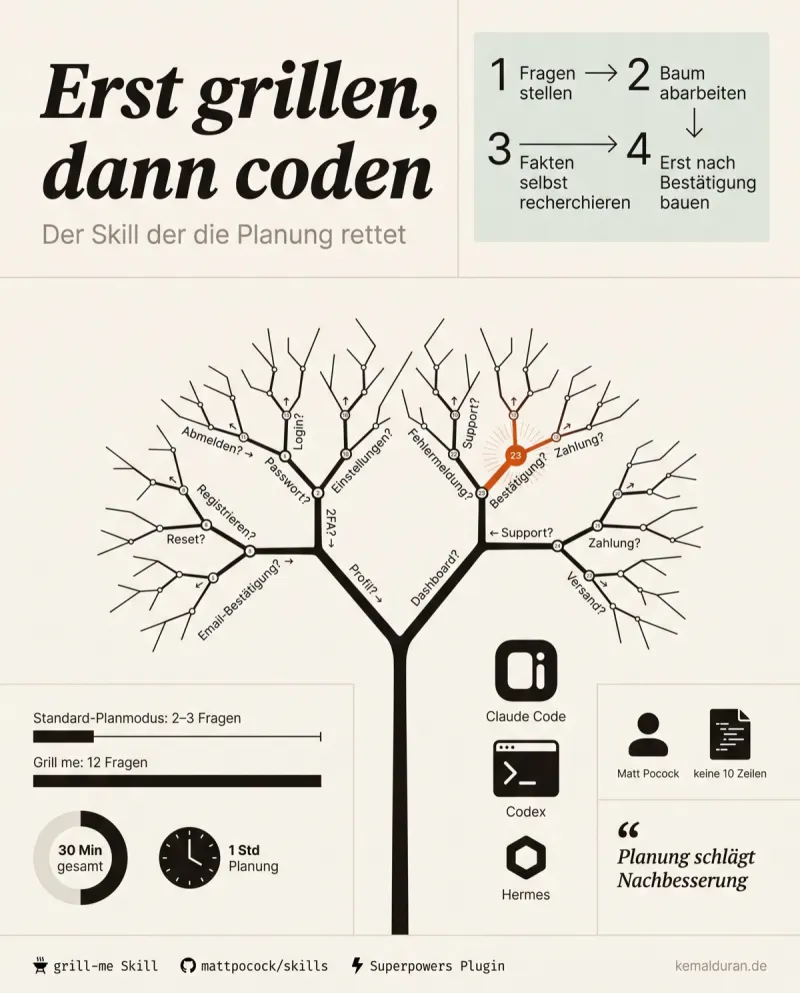
The moment you become the proofreader of your own idea
You tell the AI what you want to build. It asks two or three questions. Then it hands you a plan. Looks clean. You read half of it, skim the rest, say "fine". Code gets written.
And then it starts.
"No, that's not what I meant." "Why did you put that in?" "This doesn't even need a login." You sit there correcting. Round after round. Your feature has turned into a review job you signed yourself up for.
That costs three things at once: time, nerves and tokens. And the bitterest part: the plan was wrong from the start. Not because the AI was dumb. It was because after two questions it believed it had understood enough.
On bigger projects I now put up to an hour into pure planning before a single line of code gets written. Sounds like a waste. It's the opposite.
Why the built-in plan mode lets you down
The obvious fix is: just use plan mode. It's built in, it's made for exactly this. But it makes a mistake that is programmed into it.
It wants to be done fast.
Two to three shallow follow-up questions, then a two-page plan document. Two pages that hardly anyone reads in full. And the part that matters most: this plan consists mostly of the AI's assumptions, not of your decisions.
That's the break. A plan is only as good as the decisions inside it. If the AI guesses how your login should work instead of asking you, it builds the wrong thing, clean and fast.
The models stopped being the problem a while ago. The current top models work cleanly for hours when the plan is right. The bottleneck has moved. It's no longer in the execution. It sits before that: does the model genuinely understand what you want? Or is it only pretending, because it stopped asking after two questions?
The mechanism: the decision tree nobody spells out
The approach that fixes this is unspectacular, and that's exactly why it's strong. Instead of the AI quickly writing a plan, it grills you with questions until the two of you share a real understanding.
The trick sits in two words: decision tree.
Take login as an example. First decision: email and password or social login? Sounds harmless. But as soon as you pick email and password, a whole branch opens up below it. Do you need a password reset? Does the email have to be confirmed? How long does the user stay logged in? Each decision spawns the next one.
The native plan mode asks "Email or social?" and moves on. The better approach works through the tree branch by branch until no open branch is left hanging at the bottom.
Then there's a second rule that matters just as much: keeping facts and decisions apart. Whatever can be derived from your environment, meaning existing files, the context, what's already there, the AI researches on its own. Only real decisions land with you. That's why you don't get buried in questions whose answers are already in the project. You only get the questions where there is a real choice to make.
How to build it yourself
The skill in question is fewer than 10 lines long. That's no understatement. That's the point. It targets the one spot that produces the most feedback loops and does nothing else.
You can build the principle in four sentences. Save it as a text file and load it globally into your agentic coding system so it's available across all your projects. Here's the scaffold, ready to copy:
Keep asking me questions until we have a real shared understanding
between us. Do not settle for shallow
answers.

Work through the decision tree branch by branch. Every decision
opens sub-decisions. Ask about those before you move on to the
next branch.

Research everything yourself that you can derive from the existing
context. Only ask me about real decisions, not about facts that
are already in the project.

Only start implementing once I have confirmed the
understanding.
And the process around it, so it takes hold:
- Prepare your context files up front. Project info, existing structure, everything the AI should derive facts from. The more it knows on its own, the fewer pointless questions.
- Call this skill on purpose instead of sliding into the default plan mode. That's an active decision, not an automatic habit.
- Answer the questions honestly. If you don't know an answer, say so instead of guessing. A guessed "yes" is worse than an "I have no idea".
- Only confirm once you feel you're both talking about the same thing. Not before.
- After the run: check whether you can turn it into a reusable skill for tasks that come up often.
A worked example. I built a small tool that collects comments and derives ideas from them. Not a huge project, a manageable tool. The run with this approach asked me 12 questions. Not a questionnaire out of nowhere. Targeted decision questions, because the context was ready beforehand. Total time for planning plus a finished, working tool: half an hour. And the part that counts: it ran on the first try. No feedback loop. No "that's not what I meant".
Compare that with the other route: two questions, a two-page plan, "fine", and then five correction rounds spread over two hours. The hour up front is the cheaper bill.
Where the approach breaks down
Now the honest limits, because without them the rest is a sales pitch.
The numbers above are my experience, not a benchmark. There's no clean measurement that proves the savings in tokens and time. The half hour and the 12 questions are a single case with a manageable task. Whether it runs as smoothly on a large, ambiguous project with dozens of parallel decision threads is an open question. A deep decision tree with wide branches can also flatten you instead of guiding you.
Second point: the skill is built for people who code, or who at least know what they are deciding on a technical level. If your only answer to "Password reset by email or security question?" is a helpless "which one is better?", the problem just moves somewhere else. The skill forces you into decisions you have to be able to make.
And the smooth best case I described assumes that your answers are clear and free of contradictions. If you give unsure or conflicting answers, it's unclear how well the approach catches that. It can only plan as well as you can decide.
My take
I don't see the skill's length as a drawback. I see it as the real argument for it. There are bigger frameworks for the same planning phase, with their own brainstorming logic and more ramp-up time. For most people that's overkill. The effect doesn't come from size. It comes from one rule: understanding first, then code.
In my own setup, the prepared context is what has proven itself most. I notice the difference right away: with well-kept context files, the AI asks the right 12 questions instead of 40 wrong ones. Without that groundwork, part of the quality drops away. That's the quiet condition that tends to get lost in the excitement. The skill is the spark. Your context is the fuel.
The one sentence to take with you: a plan built on two questions isn't a plan. It's a guess with formatting.
FAQ
What's the difference between the native plan mode and this skill?
The native plan mode asks two to three shallow questions and then writes a plan on its own that consists mostly of assumptions. The skill works through a decision tree branch by branch instead and keeps asking until there is a real shared understanding. That way the plan comes from your decisions, not from the AI's guesses.
How long is the skill and where do I put it?
The skill is fewer than 10 lines of text, shown in the article as a four-part scaffold. You save it as a text file and load it globally into your agentic coding system so it's available across all your projects. You don't need any special software for it.
What is a decision tree in this context?
Here, a decision tree is the sequence of questions in which every answer opens further sub-questions. Say you pick email and password over social login: questions about password reset, email confirmation and how long a login lasts follow automatically. The skill works through this tree down to the last open branch before any code gets written.
Is an hour of planning worth it before any code gets written?
That can't be proven across the board. There's no clean measurement for it, only experience from practice. In one example in the article, half an hour of planning with 12 targeted questions led to a working tool with no correction round. The comparison would be a short plan followed by several correction rounds over two hours, which cost more in total.
Who is this planning skill not a good fit for?
The skill assumes you can make technical decisions yourself, such as whether a password reset should run by email or by security question. If you have no answer to questions like that, the problem only moves somewhere else instead of getting solved. For huge, ambiguous projects with many parallel decision threads, it's also unclear whether the approach works just as well.
To build it yourself
- mattpocock/skills (GitHub repo), Matt Pocock's public skill directory under the MIT license. It contains the grill-me skill and other engineering skills and can also be installed as a native plugin.
- grill-me skill, The planning skill itself: the AI interviews you along the decision tree until you share an understanding, instead of writing a plan right away.
- Superpowers plugin, A bigger skill framework with its own brainstorming and planning phase, if the lean approach isn't enough for you.