Your voice bot talks. It doesn't think.
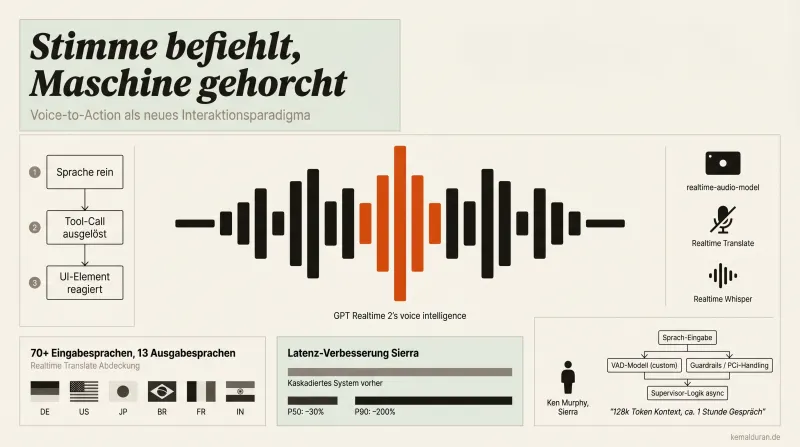
The problem isn't the voice. The problem is what's missing behind it.
I'm seeing the same thing everywhere right now.
Startup builds a voice feature. Voice sounds good. Demo runs through. First real user call, and somewhere between "How can I help you?" and a product question spanning three steps, the system falls apart.
Not because the model is bad.
But because the model alone was never the system.
What I've seen more and more clearly over the last few months with voice integrations, my own and other people's: speech as an interface is a world of its own. Not a text wrapper with a microphone. A design problem of its own.
Here's what I've learned.
Voice-to-action isn't a gimmick. It's the real shift.
The classic pattern: User asks. Model answers. User reacts.
The new pattern: User says something. Model thinks. Dashboard filters get set. Product opens. Cart updates. And the model says, nothing.
Because it doesn't need to say anything.
The output is the action, not the answer.
That sounds technical. It is. But the strategic implication is bigger: as soon as a voice system no longer "answers" but "executes", the user's expectations change completely. And with them, the value you can deliver.
A voice interface that only talks is fast dialogue.
A voice interface that acts is automation that feels frictionless to humans.
That's not an upgrade. That's a different category.
The base model is the starting point, not the product.
This is where most of the time gets lost.
You take a good language model, wrap a few prompts around it, let it talk, and call it a voice agent.
It's not an agent. It's a model that answers.
What real production deployments at enterprise customers with millions of calls make visible: the base model is maybe thirty percent of the work. The rest is the harness.
What belongs to the harness:
Custom VAD models. Voice Activity Detection out of the box works well with clean studio audio. Not so well when a child is screaming in the background, the user has a strong accent or the call comes from a loud factory floor. In real environments you need your own tuning or a dedicated model.
Workflow definitions. Not every conversation is the same. A customer service call for a telecom provider follows different rules than a medical triage conversation. These rules have to be modeled explicitly, not dumped into the prompt.
Guardrails. What must the model never say? What does it have to say? Which actions are off limits in every case, no matter how cleverly the user asks? These limits aren't a prompt problem. They're an architecture problem.
Session management. A conversation can run longer than an hour. Calls get cut off. Users call back. Without explicit state management you lose the context, and the user notices right away.
Context is the real currency in long calls.
The specific problem that gets underestimated most often in production:
What happens after thirty minutes of conversation? After a call drop?
Models have context windows. When a conversation goes past the window or a session ends, the state is gone, unless you saved it.
The fix is simple in concept: persist the session state, pass it in as context when the next session starts.
The implementation is less simple. But it isn't an optional feature. It's the condition for a customer dialogue that lasts hours or days to feel like one connected conversation, and not like a restart with amnesia.
Another architecture detail that makes the difference in production: asynchronous tool calls. When a background process is running, database query, payment validation, CRM update, the model doesn't have to wait in silence. It can keep talking. The result gets injected into the session afterward, without triggering a new model response.
That's not a trick. That's the difference between a call that feels smooth and one that stutters along in three-second pauses.
Critical passages need control, not politeness.
A use case most people overlook until it turns into a compliance problem:
Legal disclaimers. Mandatory information. Privacy notices.
In a normal conversation the user interrupts. That's good. That's human.
With a mandatory statement, it's a problem.
The fix: turn off VAD for these specific turns. The model talks through. Guaranteed. No way to interrupt until the statement is complete.
That sounds like a small technical detail.
For fintech, healthcare, insurance, it's the difference between a system that can pass compliance and one that fails the first audit.
Thinking models are a real turning point. But with a catch.
The best voice agents in production that I've analyzed so far are moving away from pure reaction models toward models that do think before they answer.
That's good for quality.
That's bad for latency.
The catch: a voice agent that thinks still has to stay conversational. It has to handle interruptions correctly. It has to make clear that it's still there, even while it's computing.
That's not a model problem. That's an interaction design problem.
How does the system behave during the thinking pause? What does the user hear? Silence? A signal? A short confirmation?
These micro-decisions determine whether a voice agent feels intelligent or like a system that's hanging.
Prompt hygiene before go-live. Not after.
A simple step that often gets skipped:
Before a prompt goes into production, have the model itself check whether it contains contradictory instructions.
Contradictions in the prompt are the most common reason for inconsistent behavior that the logs can't explain right away. The model follows, but which instruction it follows isn't determined.
A self-audit takes five minutes. The debugging afterward takes days.
What this means for you if you're building voice into a product.
Voice isn't the surface. Voice is the interface to an architecture that has to sit underneath.
If the architecture is missing, the voice is just a backdrop.
If the architecture is right, voice is the most natural interface a user has ever had, because they don't even notice they're talking to a system.
That's the difference.
And it decides whether your voice feature stays a demo or becomes a product.
FAQ
What is a voice agent harness?
The harness is the sum of all the systems built around the bare language model so that a voice agent works reliably. That includes VAD models and workflow definitions, plus guardrails and session management. Without a harness, the model stays a component that answers questions instead of reliably running a conversation.
What does VAD mean in voice AI?
VAD stands for Voice Activity Detection, meaning the detection of when a user is speaking and when not. In a clean studio environment, standard VAD works well. In loud environments or with heavy accents, it often isn't reliable. That's why production voice systems usually need their own tuning or a dedicated VAD model.
Why does my voice bot lose context in long conversations?
Language models work with a limited context window. When a conversation goes past that window or a call drop interrupts a session, the conversation state so far is lost. The fix is to save the session state and feed it back in as context when the next session starts.
What are asynchronous tool calls in voice AI?
Asynchronous tool calls let the model keep talking instead of going silent while a background process such as a database query or payment validation runs. The result of that process is fed into the session afterward, with no new model response needed. This prevents unnatural pauses in the flow of the conversation.
Why are thinking models a problem for voice agents?
Thinking models reason before they answer, which improves answer quality but raises latency. In voice interfaces this means the agent has to stay conversational during the thinking pause and keep handling interruptions correctly. That isn't purely a model problem. It's a question of interaction design during the wait.