Why I stopped sitting next to my AI
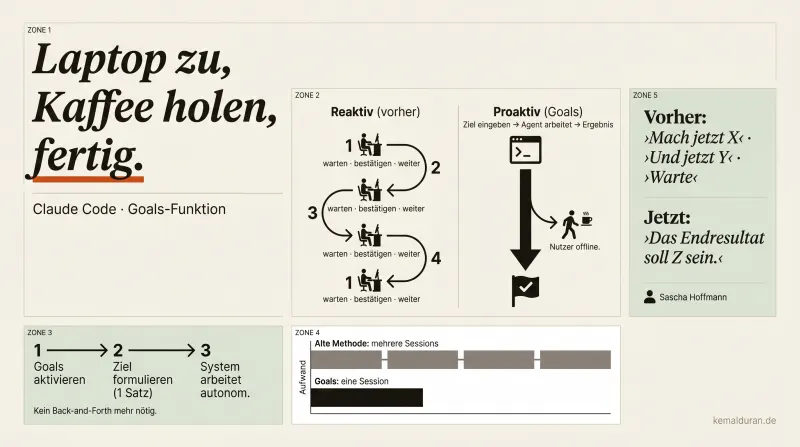
The moment that changed everything
I typed one sentence.
Closed the laptop.
Got a coffee.
Came back, and the task was done.
No waiting. No confirming. No "Yes, keep going." No fifth window I had to keep an eye on at the same time.
That sounds like a small thing. It isn't a small thing.
The problem nobody said out loud
If you use Claude Code seriously, you know the pattern:
You start a session. Describe the project. Wait. Read the output. Reply. Wait. Read. Reply. Wait.
You're not the developer. You're the metronome.
The system works, but only while you're there. Like a craftsman who asks after every step whether he may carry on.
The workaround most people use: several sessions open at the same time. Five windows, five running conversations, five places where you wait for a confirmation. More tabs, same underlying problem.
Reactive is the word. The system waits for you. Real delegation isn't possible.
Reactive isn't an agent. Proactive is.
There's an important difference that most people don't spell out:
A reactive system responds to input.
A proactive agent steers toward the goal on its own.
That sounds academic. It isn't.
When you tell an employee "Write me a report by Friday", do you expect him to ask you every hour whether he may keep writing? No. You expect independent work within a clear goal horizon.
That's exactly the difference between reactive and proactive.
Until now, Claude Code was reactive. With the Goals feature, it's shifting toward a proactive agent.
What Goals changes in practice
Goals isn't a surface update. It's a structural shift.
You write down a goal, a real, higher-level goal, not an instruction in the imperative. The system takes over from there. Without confirmation steps. Without pausing. It keeps working until the goal is reached or a real blocker comes up.
You can go offline. Close the laptop. The task keeps running.
What that means day to day:
Instead of juggling five parallel sessions, one session, one clear goal, no babysitting.
Instead of playing metronome, real delegation.
Instead of sitting next to the system, arriving next to the result.
That's the difference between a tool you operate and a system that works for you.
Why your prompting is the real problem
Here's the catch that most people miss.
Turning on Goals is the easy part. Changing your working style is the real task.
If you've worked reactively for years, you write reactive prompts: "Do X now." "Next, Y." "Can you adjust Z?" Those are instructions, not goals. For a proactive agent, they're the wrong feed.
A proactive agent needs a picture of the end result, not a step-by-step list.
"The finished module should be able to do the following: ..." is a goal.
"Write the function now and then ask me" is an instruction.
The difference sounds small. In the output, it's huge.
If you use Goals the way you used the old reactive method, you'll get reactive results. The feature is only as good as the goal description you feed it.
What this means for builders
If you're building software right now, automating workflows or integrating AI agents into your own products, you now have a reference model for the real problem:
Not a lack of power. A lack of autonomy.
Most AI workflows don't fail because the model is too weak. They fail because too many manual confirmation loops break the flow. Goals shows how to do it differently, and it shows that the bottleneck almost always sits in the structure of the task handoff, not in the computing power.
That's a pattern that reaches far beyond Claude Code.
The sentence you should write now
Not: "What should I do next?"
But: "What should be there at the end?"
Write this sentence. Clear. Concrete. With a picture of the result, not a list of steps.
Then close the laptop.
Get a coffee.
Come back.
FAQ
What is the Goals feature in Claude Code?
Goals is a feature that lets you give Claude Code a higher-level goal instead of a single instruction. The system then works toward it on its own, without needing your confirmation after every step. It only stops once the goal is reached or a real blocker comes up.
What's the difference between a reactive and a proactive agent?
A reactive system waits for your confirmation after every step and only responds to specific input. A proactive agent gets a goal and steers there on its own, without constant check-ins. With Goals, Claude Code is moving from reactive toward proactive.
Do I have to write my prompts for Claude Code with Goals differently?
Yes. Reactive prompts like 'Do X now' or 'Ask me afterwards' work poorly with a proactive agent, because they are instructions, not goals. A description of the finished result works better, for example 'The finished module should be able to do the following'. The agent needs a picture of the end state, not a step-by-step list.
Can I leave Claude Code offline while it works with Goals?
Yes, that's the central point of the feature. Once the goal is written down, the system keeps working without pauses or confirmation steps, even if you close the laptop. You come back when the task is done or a real blocker has come up.
Why do many AI workflows fail despite strong models?
The problem usually lies not in the model's capability but in too many manual confirmation loops that interrupt the flow of work. The bottleneck sits in the structure of the task handoff, not in the computing power. Goals shows how more autonomy in the way you set the task fixes that.