The agent that knows your browser
The limit nobody names
Everyone talks about AI agents.
Nobody talks about where they stop.
The limit is usually right where your actual work starts: in the browser. Logged in. With your session, your cookies, your tabs. Expense report here. Form there. Three open web apps, none of which has an API that any plugin knows.
At this point most agents do the same thing.
They write you a nice summary of why they unfortunately can't do it.
Plugins are good. Until they aren't.
I'm a fan of structured integrations. If a plugin exists, use it. It's fast, it's reliable, it doesn't have to click its way through UI elements like a tired intern.
But plugins don't exist for every service.
Some features are only available in the full web app. Some workflows need the combination of both, plugin for the structured data, browser for the interaction. And sometimes the context is just your existing session. The state you're logged in with right now. You can't replicate that with a plugin.
This is where a different logic begins.
What happens when the agent enters your browser
Picture this: an agent doesn't work next to your browser.
It works inside it.
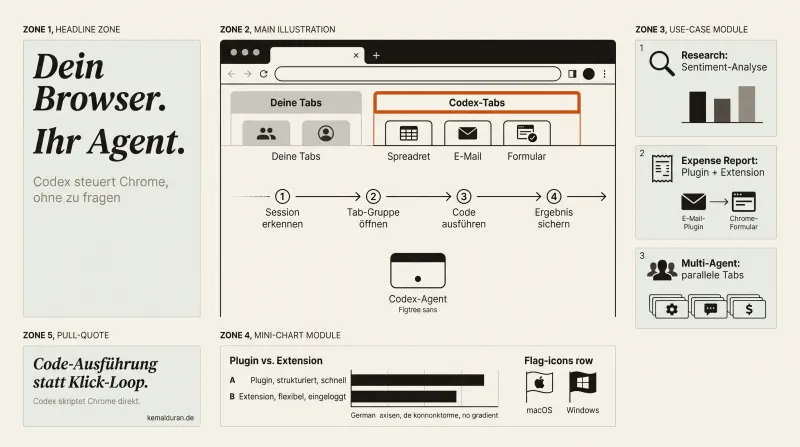
Same profile. Same cookies. Same logged-in apps. It sees the same world you see when you open your browser in the morning. Except it doesn't click, it scripts. Code execution instead of a screenshot-reasoning-mouse-click loop. That's not a cosmetic difference. It's the difference between an agent that understands your work and an agent that understands a simulation of your work.
At the same time, it doesn't get in your way.
It works in an isolated tab group. Your tabs stay your tabs. It opens its own, scrolls, extracts, writes, while you keep working.
Three situations I keep seeing
First situation: research. You want to know what real users think about a launch. Not the press release. Not the LinkedIn comments from your bubble. Real sentiment, real pain points, real use cases. The agent opens several tabs in parallel, extracts content, pulls everything together into one document. You drink your coffee. The result is sitting there, done.
Second situation: repetitive forms. Expense reports. Onboarding processes. Moving data from one source into a web app. All work you're overqualified for that still lands on your desk. An agent that knows these forms and can script them doesn't solve this someday. It solves it today.
Third situation: combined workflows. The plugin pulls the receipts from your inbox. The browser fills out the expense form and uploads the receipts. Two different ways in, one connected job. No copy-paste from you. No tab switching. No "just bridge it by hand for a second".
These aren't science fiction scenarios.
These are Monday morning problems.
Why this is more than a browser trick
For some time now I've been watching how companies use AI.
The pattern is always similar: you start with the obvious. Generating text. Summarizing emails. Transcribing meetings. Good. Right. Sensible.
Then you hit the first real limit: the AI can't get to the place where the work happens. The internal tools. The customer portals. The web apps that don't open an API to the outside.
This limit is where companies make their choice.
Some accept it. The others build bridges.
An agent that works in your real browser session is one of those bridges. Not because it solves everything. But because it takes on a category of work that until now counted as "not automatable", not for technical reasons, but because the access was missing.
What you should check now
Take an honest inventory of your week.
How many hours did you spend moving data from A to B? Filling out forms you've already filled out ten times? Switching tabs to pull together information from three sources?
That isn't work. That's administration of work.
And administration of work is exactly where an agent in your browser can start.
Not someday.
Today.
FAQ
What exactly is a browser agent?
A browser agent is an AI that works directly in your real browser session, with your profile, your cookies and your logged-in apps. It doesn't interact through an API but through the browser itself, the same way you would. That lets it operate web apps that have no plugin.
Is it safe to let an agent work with my own session?
The agent does use your session, but it works in an isolated tab group, separate from your own tabs. That way your ongoing work isn't disrupted or overwritten. Still, you should keep checking sensitive access and critical actions like payments or deletions yourself before they run.
How is this different from classic browser automation with clicks?
Classic automation often runs through a screenshot-reasoning-mouse-click loop: look at the screen, think, click, look again. An agent in the real browser can run code instead and script actions directly. That's faster and more reliable, because not every step has to be interpreted visually from scratch.
When do I need a browser agent at all instead of a plugin?
A plugin is enough when a service offers a structured interface that the plugin knows. As soon as a feature is only available in the full web app, or access is tied to your logged-in session, a plugin hits its limit. That's the exact spot where an agent that works in the browser itself takes over.
Which everyday tasks is this most worth it for?
Typical cases are research across several tabs, filling out recurring forms like expense reports, and combined workflows where a plugin delivers data and the browser processes it in a web app. It's mostly work that is more administration than actual thinking.